Mijot is an iOS meal management application that I designed to answer a very simple question: What can you cook with the food you actually just bought?
After shopping, it's easy to forget what's in the fridge, let certain products expire, or run out of ideas when preparing a meal. My objective was therefore to build a continuous journey: starting from a receipt, automatically creating an inventory, offering adapted recipes, then organizing these meals during the week.
Mijot combines a native interface developed in SwiftUI with document analysis and structured recipe generation using the Gemini API.
ILLUSTRATION 1 — Featured image
1. The project idea
Most recipe apps start from a catalog: the user searches for a dish, then checks if it has the necessary ingredients. With Mijot, I wanted to reverse this logic. The application starts from user's actual stock and builds the proposals around what is already available.
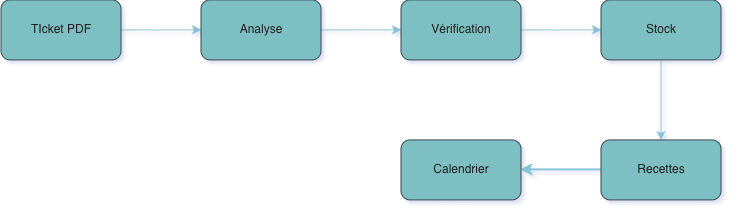
The main workflow has six steps:
select a receipt in PDF format;
detect food products, their quantities and prices;
verify and correct the information provided;
add the products to a local inventory;
generate recipes corresponding to the user's stock and preferences;
place meals in a weekly schedule and, if desired, in Apple Calendar.
The goal is not to remove all control from the user. Artificial intelligence speeds up typing and suggests ideas, but important information can still be edited before it is saved.
ILLUSTRATION 2 — Overall workflow
The complete Mijot journey, from shopping to meal planning
2. Turn a receipt into usable data
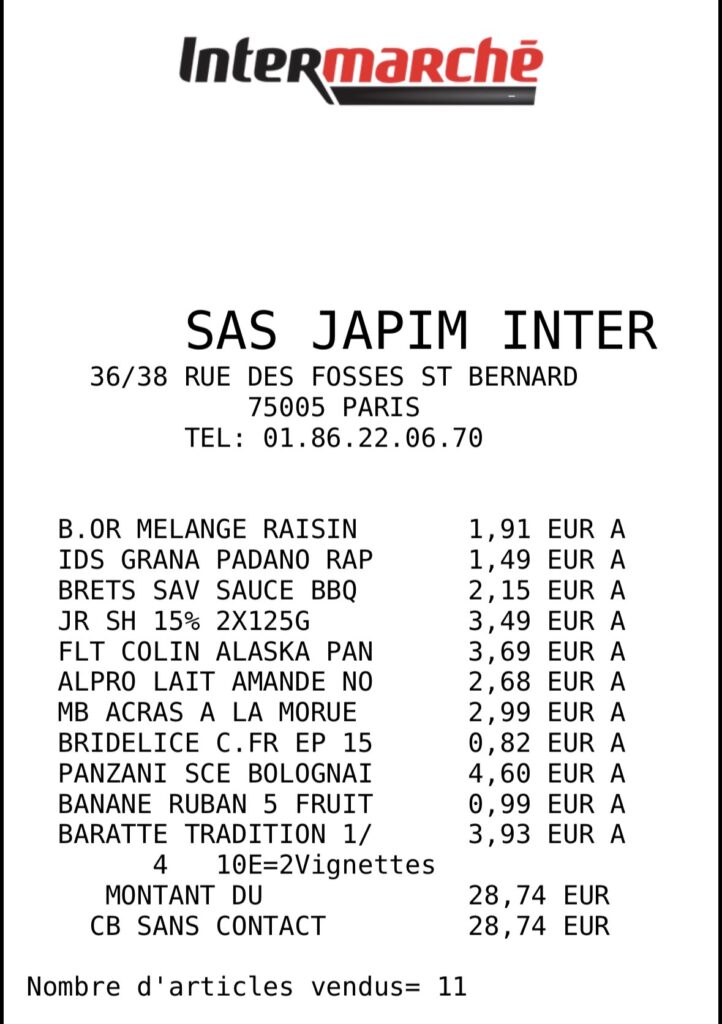
The first difficulty concerned the great diversity of receipts. The same product can be abbreviated, separated on several lines or accompanied by numerous numbers: weight, price per kilogram, discount and final price.
Mijot begins by opening the document with PDFKit. For sufficiently light PDFs, the document is sent directly to Gemini in order to preserve its layout and to better understand the different columns. When the file is too large or does not contain usable text, the application extracts its content locally and can use Vision as a fallback OCR solution.
Gemini then returns a structured JSON response containing in particular:
the legible name of each food;
quantity and its unit;
the price actually paid for the line;
a food category;
recommended storage;
a level of confidence;
an emoji to quickly identify the product.
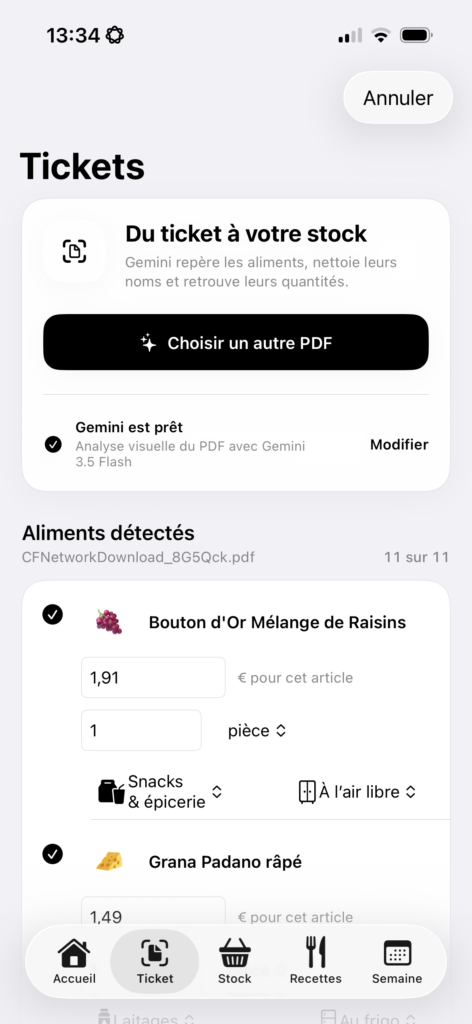
Addresses, payment methods, totals, telephone numbers and other administrative lines must be excluded. As no recognition system is perfect, Mijot always displays a validation screen before importing. The user can modify the name, quantity, price, category or storage location, but also remove a product detected in error.
ILLUSTRATION 3 — Receipt analysis
An unstructured ticket becomes a verifiable food list
3. A local and understandable inventory
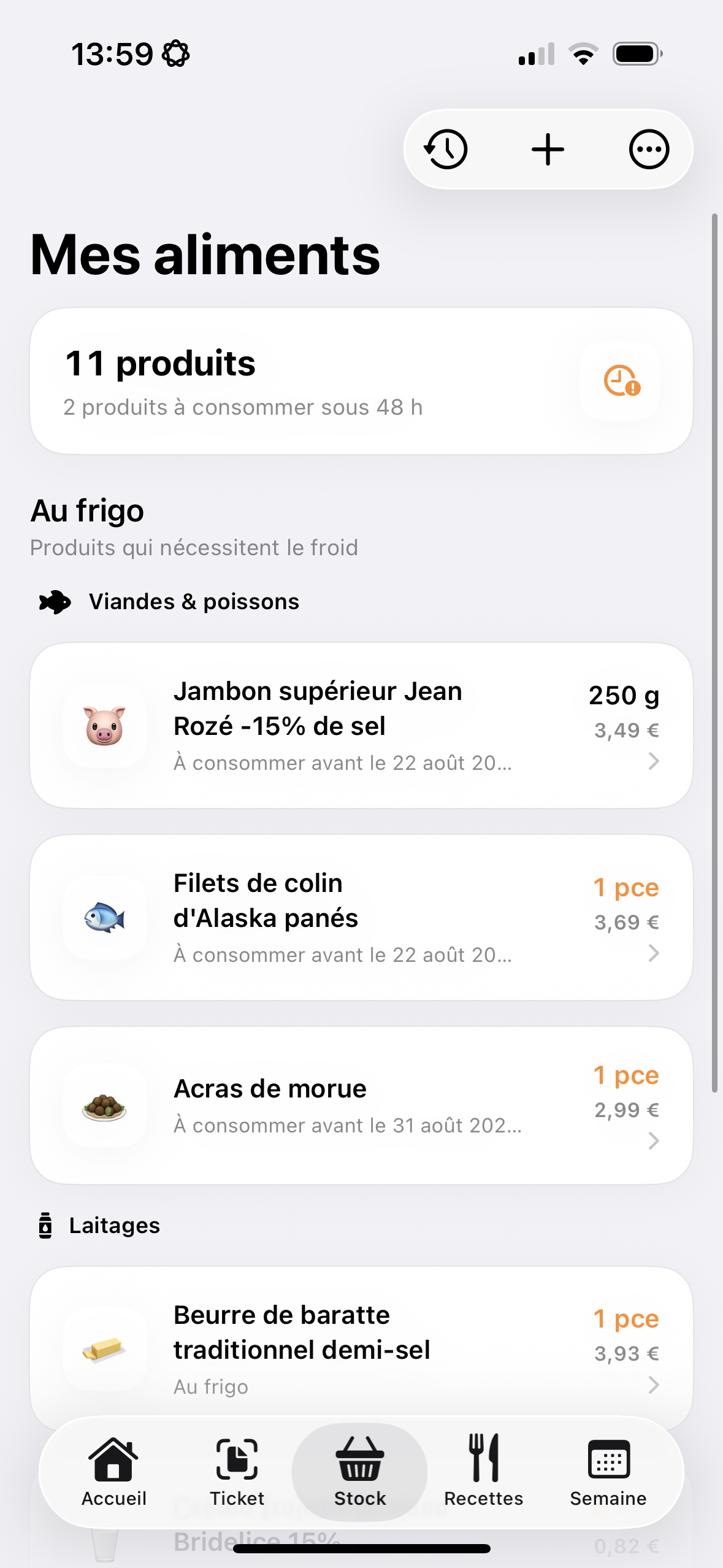
Once validated, the food joins a private inventory saved on the device. Products are separated into those that can be stored in the refrigerator and those that can stay at room temperature. They are also classified into four families: meat and fish, fruit and vegetables, dairy products, then snacks and groceries.
Each item retains its quantity, its unit, its possible unit price, its date of addition and, when relevant, an estimated use-by date. Fresh meats and fish can thus be brought forward to be used quickly.
The inventory can also be corrected manually. A history keeps the additions from tickets and the quantities removed when a dish is indicated as prepared.
ILLUSTRATION 4 — Inventory
Mijot food inventory organized by storage and category
4. Recipes generated from actual stock
Mijot does not present a fixed catalog. The user chooses the number of desired proposals, between one and fourteen, then Gemini composes the recipes from the foods present.
A profile allows you to specify:
diet;
allergies or intolerances;
foods liked or refused;
favorite cuisines;
the desired calorie range;
authorized starchy foods;
spice level;
the maximum preparation time;
available appliances, such as the oven, frying pan or Airfryer.
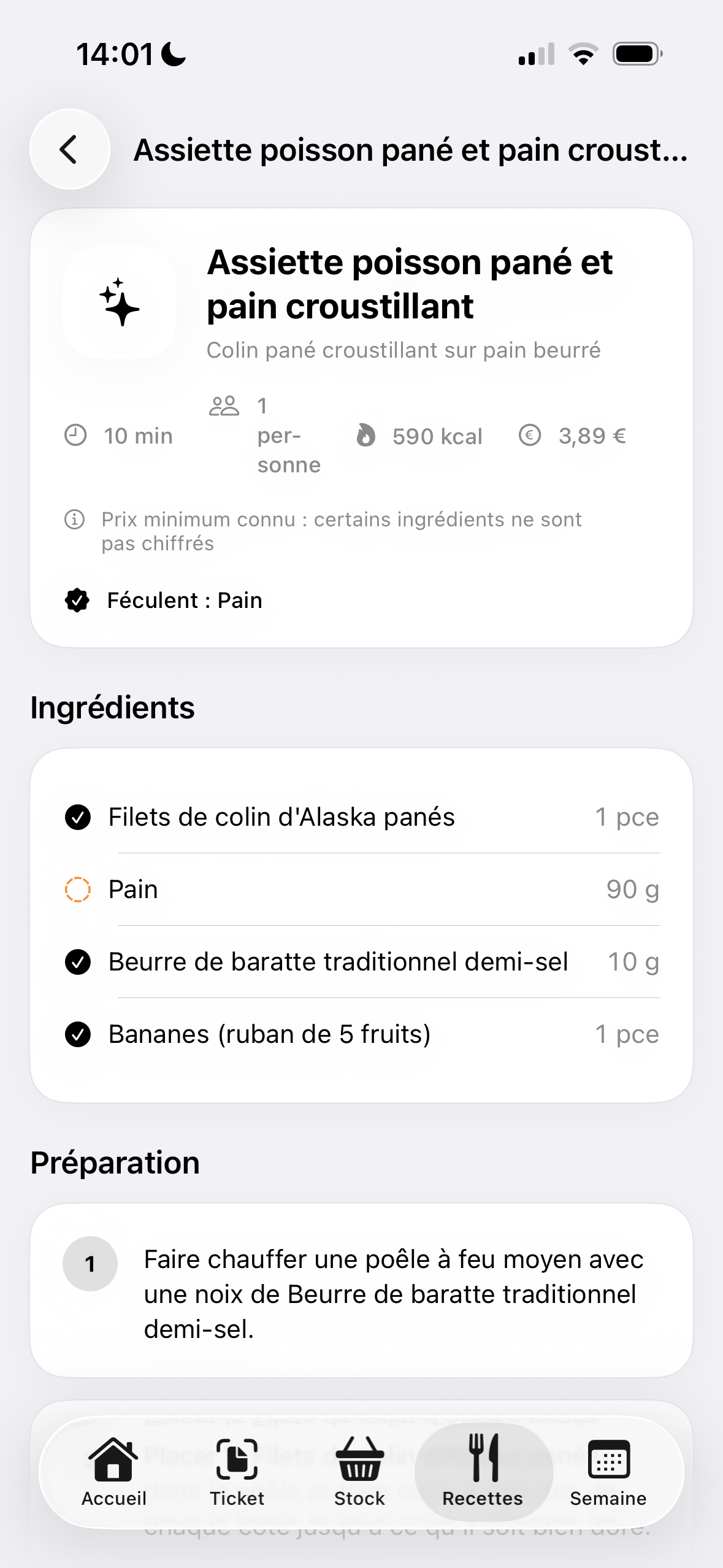
The responses are constrained by a JSON schema to obtain, for each recipe, a title, preparation time, calorie estimate, list of ingredients and ordered steps. The quantities used are then compared to the inventory.
When the price of an ingredient is known thanks to the ticket, Mijot also estimates the cost of the portion. This feature allows you to display the total recipe budget and an average price per meal.
Nutritional information remains estimates produced by a generative model. They do not replace a certified nutritional basis or medical advice, and each recipe must be checked in the event of a significant allergy.
ILLUSTRATION 5 — Recipes and budget
Recipe generated according to preferences with preparation instructions
5. Plan the week and sync the calendar
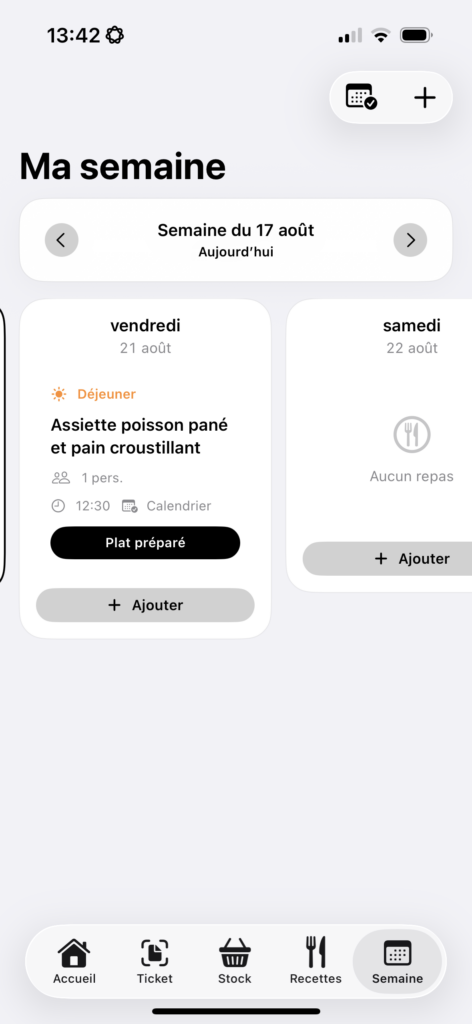
A recipe can be added to one or more lunches or dinners. The weekly schedule then allows you to move meals by drag and drop, delete them or indicate that they have been prepared.
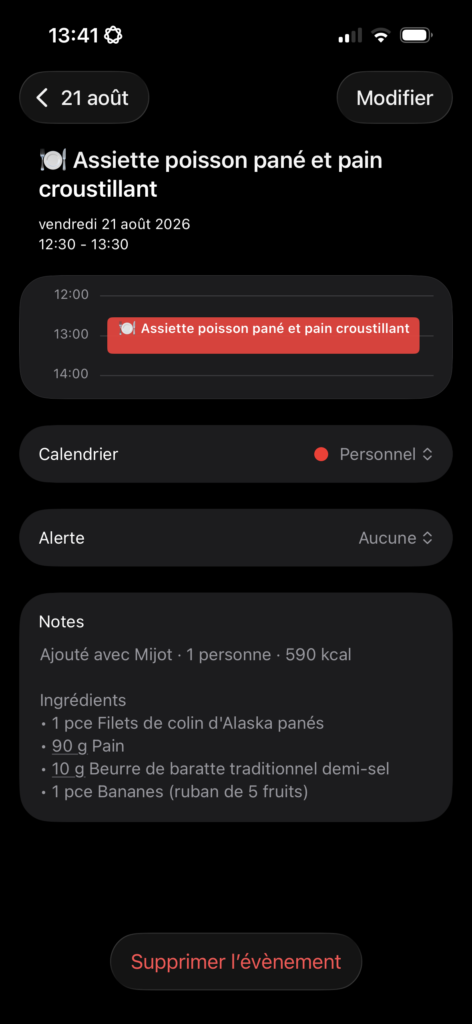
Integration is based on EventKit, Apple's calendar framework. With the user's permission, Mijot creates an event including the name of the dish, time, number of servings and list of ingredients. The destination calendar can be an Apple, iCloud, or Google calendar already set up on the iPhone.
The stock is only reduced after the “Prepared dish” action. This choice avoids automatically considering that a planned meal has actually been cooked.
ILLUSTRATION 6 — Schedule
Meals organized in Mijot and synchronized with the iPhone calendar
6. Technical architecture
Mijot is developed entirely with native Apple technologies and does not depend on any external Swift library.
Need
Technology used
Interface
Swift and SwiftUI
Reading tickets
PDFKit
Local fallback OCR
Vision
Analysis and generation
Gemini API with structured JSON responses
Patterns and persistence
Codable, JSON and UserDefaults
API key storage
Keychain Services
Calendar
EventKit
Testing
XCTest
The app’s main data model includes inventory, stock movements, recipes, the food profile and planned meals. The services responsible for Gemini, PDFs and calendar are separated from the interface in order to maintain a readable data flow.
ILLUSTRATION 7 — Technical diagram
Simplified architecture of the Mijot application
7. Privacy and AI limitations
The project was designed as a personal prototype. Inventory, history, profile and schedule remain saved locally. The user-provided Gemini key is kept in the iPhone Keychain and is never integrated into the source code.
Certain data must nevertheless be transmitted to Gemini to provide the expected functionalities:
the ticket during its analysis, or its text extracted locally;
the names, quantities, categories and prices of the stock at the time of generation;
food preferences needed for personalization.
This distinction is explained directly in the application. For possible wider distribution, calls to the model should be placed behind an intermediary service with authentication, quota tracking, and a comprehensive privacy policy.
8. Key challenges
Moving from an ambiguous document to a reliable structure
A ticket is designed to be read by a person, not by an application. I had to precisely define the expected data and add a human validation step rather than considering the model response as always correct.
Maintain consistent units
Food can be expressed in parts, grams, kilograms, milliliters, centiliters or liters. Conversions are necessary to compare inventory to a recipe's needs and correctly calculate its cost.
Connect multiple features in a single journey
The project is not just about calling an API. The interest comes from the continuity between import, local persistence, generation, budget calculation, planning and calendar. Designing these transitions taught me to think about a complete product rather than an isolated demonstration.
Defining the right place for AI
Gemini is useful for interpreting irregular wording and producing varied ideas. On the other hand, deterministic operations — conversions, prices, storage, dates and inventory movements — remain managed by the application code. This project taught me not to use a generative model for tasks that require an exact result.
9. What I learned
This project allowed me to deepen several aspects of iOS development:
design a SwiftUI application composed of several linked paths;
use PDFKit and Vision to process documents;
obtain structured JSON outputs from a multimodal model;
protect an API key with iOS Keychain;
manage persistent data with Codable;
sync items with EventKit;
calculate costs from different quantities and units;
predict errors, manual corrections and limitations of an AI-based system.
10. Next steps
Mijot remains a prototype in development. The next steps envisaged are:
improve testing with more anonymized ticket formats;
allow the analysis of a photo in addition to PDFs;
keep a complete copy of the recipes already planned;
strengthen quantity controls before removing ingredients;
add a family mode with multiple profiles and a shared calendar;
offer optional daily monitoring of meals and snacks.
Before adding new features, my priority is to make the heart of the product more reliable: ticket recognition, inventory consistency and conservation of planned recipes.
11. Result
Mijot allowed me to build an application that combines document processing, artificial intelligence, local storage and native iOS services around concrete daily use.
The result is a prototype capable of transforming a receipt into directly useful information: an inventory, meal ideas, a budget estimate and a weekly schedule.