
1. Presentation
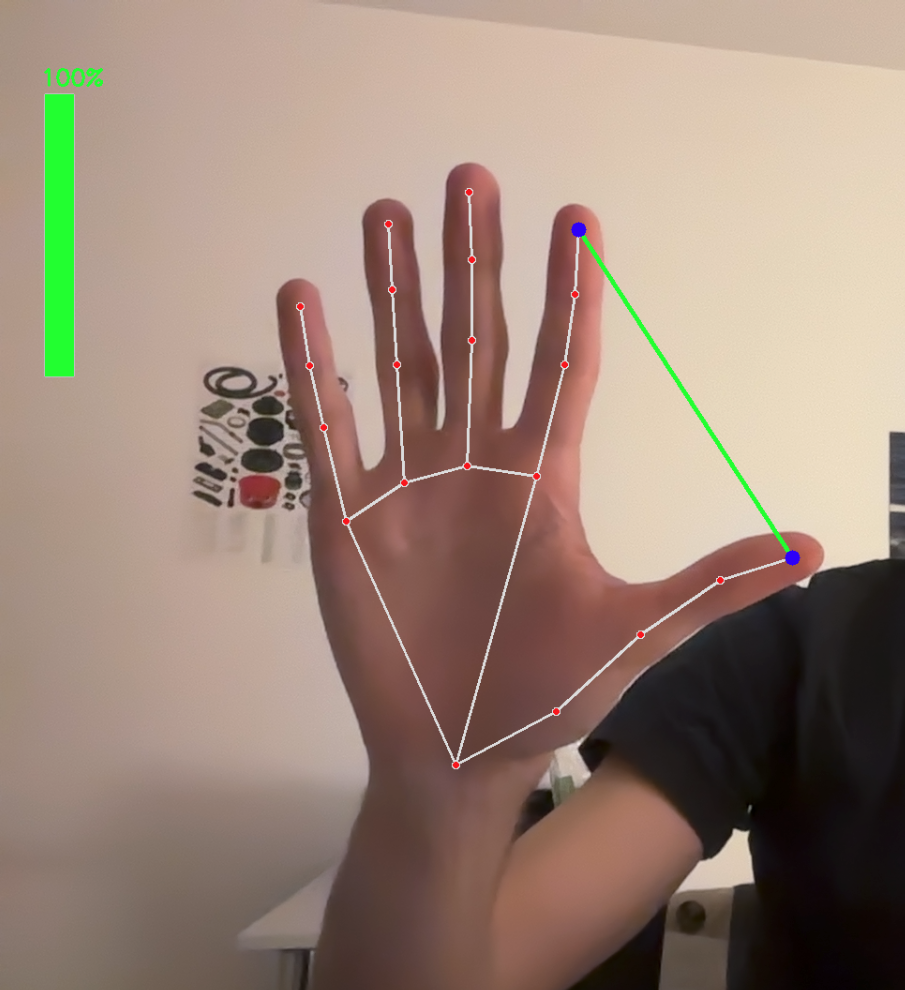
In this new project, after seeing people on Instagram controlling all sorts of things, such as photos and waves, with their hands, I did some research on the subject and discovered MediaPip, a library that uses machine learning to track the position of hands, faces, and the human body with a more or less accurate point cloud. That’s when I had the idea of controlling music with my hands, from the volume to changing songs. With a little help, I was able to write a Python script that allows me to do this. Called Apple Music Hand Tracker, in my case, I did it with Apple Music because that’s my music platform. It would have worked just as well with Spotify, provided you have Premium, as remote music control requires payment. For the code, all you need to do is create a developer account. I refer you to my first project, which explains it: Here.
I hope you like this project. In the coming days, I’ll try to create a clean interface to make it more enjoyable than compiling Python code!
What’s more, you can have fun with all sorts of things, such as controlling the angle of a servo motor with your hand (but I find that rather basic). I’d like to take the use of MediaPipe a step further, for example by associating a password with a facial expression, like Apple’s new authentication keys for those in the know ^^…
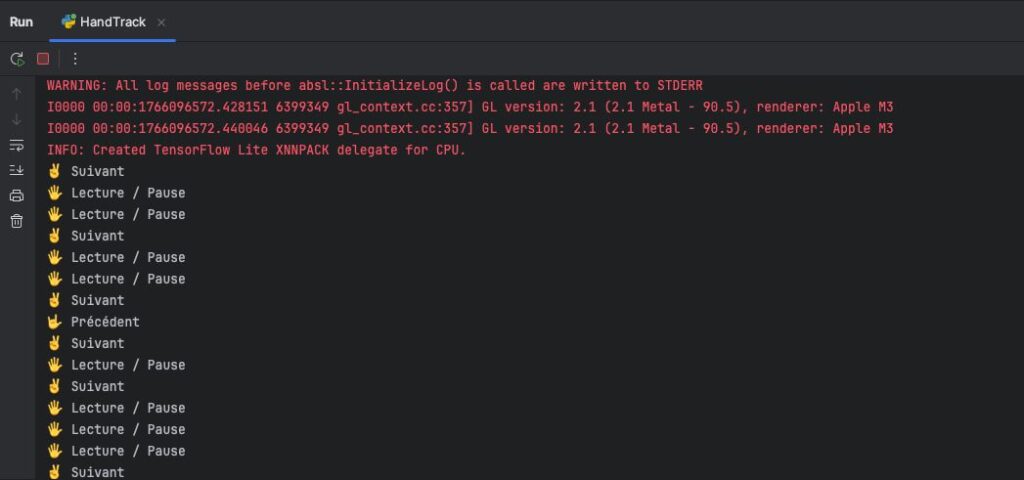
1. Short Video with logs
2. Code
import cv2
import mediapipe as mp
import os
import time
import math

# Initialisation MediaPipe
mp_hands = mp.solutions.hands
hands = mp_hands.Hands(
    static_image_mode=False,
    max_num_hands=2,
    min_detection_confidence=0.75,
    min_tracking_confidence=0.75
)

mp_draw = mp.solutions.drawing_utils

# FaceMesh
mp_face = mp.solutions.face_mesh
face_mesh = mp_face.FaceMesh(
    static_image_mode=False,
    max_num_faces=1,
    refine_landmarks=True,
    min_detection_confidence=0.7,
    min_tracking_confidence=0.7
)

# Initialisation webcam
cap = cv2.VideoCapture(0)

# État du dernier geste
last_gesture = None
last_time = 0
gesture_delay = 2

# Volume initial
volume = 50  # Entre 0 et 100
previous_volume = volume  # Pour éviter les appels trop fréquents

def count_fingers(hand_landmarks):
    fingers = []
    tips_ids = [8, 12, 16, 20]

    # Pouce
    if hand_landmarks.landmark[4].x < hand_landmarks.landmark[3].x:
        fingers.append(1)
    else:
        fingers.append(0)

    # Autres doigts
    for tip_id in tips_ids:
        if hand_landmarks.landmark[tip_id].y < hand_landmarks.landmark[tip_id - 2].y:
            fingers.append(1)
        else:
            fingers.append(0)

    return sum(fingers)

def send_command_to_apple_music(command):
    if command == "playpause":
        os.system("osascript -e 'tell application \"Music\" to playpause'")
    elif command == "next":
        os.system("osascript -e 'tell application \"Music\" to next track'")
    elif command == "previous":
        os.system("osascript -e 'tell application \"Music\" to previous track'")

def get_distance(lm1, lm2, frame_width, frame_height):
    x1, y1 = int(lm1.x * frame_width), int(lm1.y * frame_height)
    x2, y2 = int(lm2.x * frame_width), int(lm2.y * frame_height)
    distance = math.hypot(x2 - x1, y2 - y1)
    return distance, (x1, y1), (x2, y2)

while True:
    success, frame = cap.read()
    if not success:
        break

    frame = cv2.flip(frame, 1)  # effet miroir
    frame_height, frame_width = frame.shape[:2]

    rgb = cv2.cvtColor(frame, cv2.COLOR_BGR2RGB)

    hand_results = hands.process(rgb)
    face_results = face_mesh.process(rgb)

    if hand_results.multi_hand_landmarks:
        for hand_landmarks, hand_info in zip(hand_results.multi_hand_landmarks, hand_results.multi_handedness):
            label = hand_info.classification[0].label  # 'Left' ou 'Right'

            mp_draw.draw_landmarks(frame, hand_landmarks, mp_hands.HAND_CONNECTIONS)

            # MAIN DROITE : contrôle de la musique
            if label == 'Right':
                finger_count = count_fingers(hand_landmarks)
                cv2.putText(frame, f"Main droite: {finger_count} doigts", (10, 50), cv2.FONT_HERSHEY_SIMPLEX, 1, (255, 0, 0), 2)

                current_time = time.time()
                if current_time - last_time > gesture_delay:
                    if finger_count == 5 and last_gesture != 5:
                        print("🖐 Lecture / Pause")
                        send_command_to_apple_music("playpause")
                        last_gesture = 5
                        last_time = current_time
                    elif finger_count == 2 and last_gesture != 2:
                        print("✌️ Suivant")
                        send_command_to_apple_music("next")
                        last_gesture = 2
                        last_time = current_time
                    elif finger_count == 3 and last_gesture != 3:
                        print("🤟 Précédent")
                        send_command_to_apple_music("previous")
                        last_gesture = 3
                        last_time = current_time

            # MAIN GAUCHE : contrôle du volume (écartement pouce/index)
            elif label == 'Left':
                lm_list = hand_landmarks.landmark
                dist, pt1, pt2 = get_distance(lm_list[4], lm_list[8], frame_width, frame_height)

                # Mapping distance -> volume
                min_dist, max_dist = 30, 200
                dist_clamped = min(max(dist, min_dist), max_dist)
                volume = int((dist_clamped - min_dist) / (max_dist - min_dist) * 100)

                # Envoie volume système si changement
                if abs(volume - previous_volume) > 2:
                    os.system(f"osascript -e 'set volume output volume {volume}'")
                    previous_volume = volume

                # Affichage visuel entre pouce/index
                cv2.line(frame, pt1, pt2, (0, 255, 0), 3)
                cv2.circle(frame, pt1, 8, (255, 0, 0), -1)
                cv2.circle(frame, pt2, 8, (255, 0, 0), -1)

    else:
        last_gesture = None

    # Affichage FaceMesh
    if face_results.multi_face_landmarks:
        for face_landmarks in face_results.multi_face_landmarks:
            mp_draw.draw_landmarks(
                frame, face_landmarks, mp_face.FACEMESH_TESSELATION,
                landmark_drawing_spec=None,
                connection_drawing_spec=mp_draw.DrawingSpec(color=(0, 255, 255), thickness=1, circle_radius=1)
            )

    # Affichage volume
    cv2.rectangle(frame, (50, 100), (80, 400), (200, 200, 200), 2)
    volume_height = int(300 * (volume / 100))
    cv2.rectangle(frame, (50, 400 - volume_height), (80, 400), (0, 255, 0), -1)
    cv2.putText(frame, f"{volume}%", (45, 90), cv2.FONT_HERSHEY_SIMPLEX, 0.8, (0, 255, 0), 2)


    cv2.imshow("Contrôle Apple Music + Volume + Face", frame)

    if cv2.waitKey(1) & 0xFF == ord('q'):
        break

cap.release()
cv2.destroyAllWindows()
Hope u like ^^ . I’ll come with news projects !!